
Choosing the Right Google Business Profile Categories for Medical Facilities
How to choose a primary category, add only relevant secondary ones and avoid the common mistakes that hide a clinic from local patients.
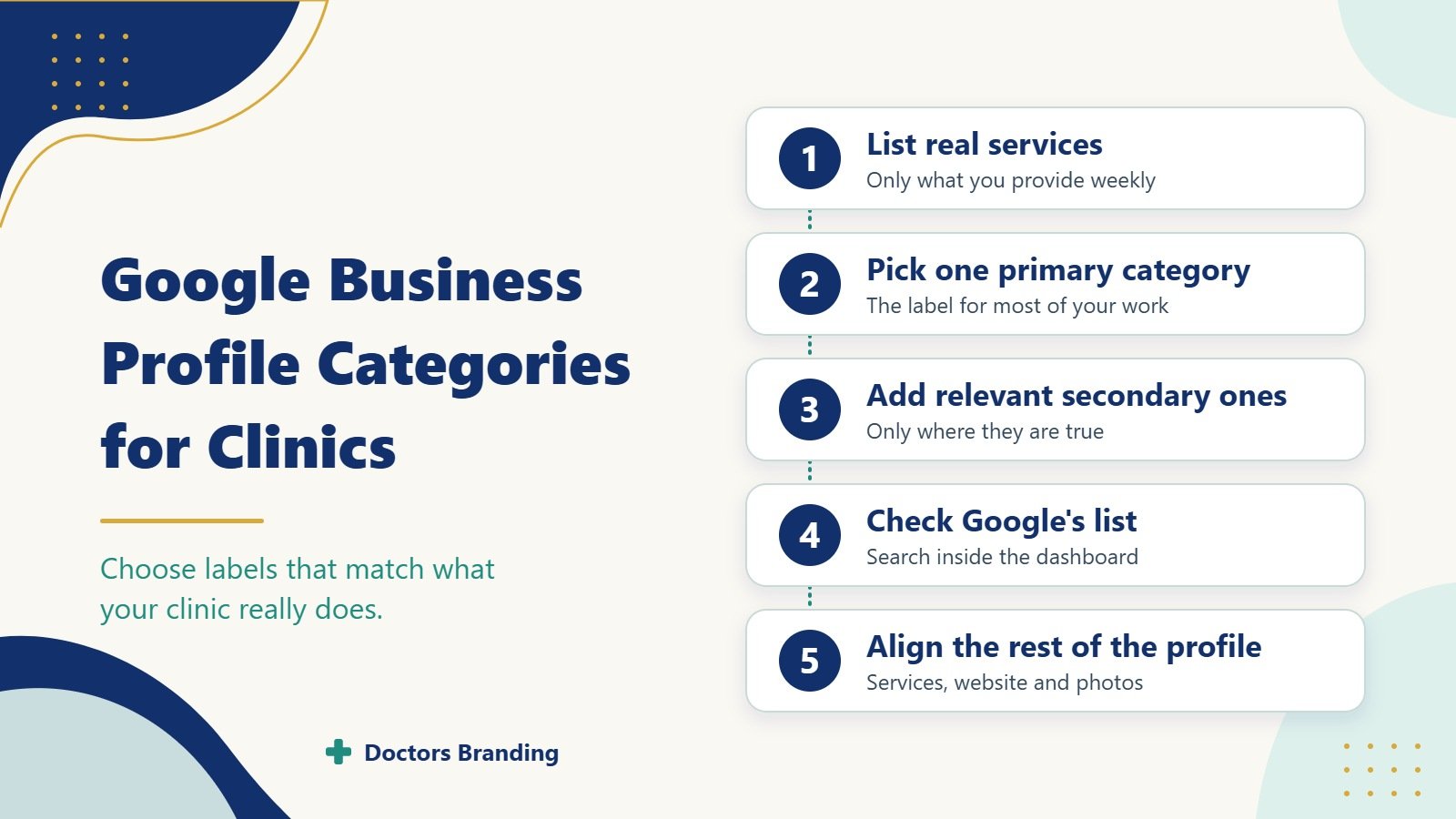
Google Business Profile categories tell Google what your clinic actually does. The wrong choice hides you from patients who need your services. The right choice helps the right people find you in local search and on Maps. This how to guide shows clinics how to pick accurate Google Business Profile categories for medical clinics without risking penalties or wasted visibility.
Categories are not keywords. They are fixed labels Google uses to match your profile to searches. A strong set of Google Business Profile categories for medical clinics starts with one clear primary category and adds only relevant secondary ones.
Why Categories Matter More Than Most Clinics Realise
Google uses the primary category as the main signal for what you offer. It influences which searches can show your profile in the local pack and on Maps. Secondary categories add extra relevance but never override the primary one.
Wrong categories create two problems. Patients searching for your real service never see you. Patients searching for something you do not offer click through and leave. Clean Google Business Profile categories for medical clinics reduce both issues.
How Google Business Profile Categories Work
Every profile has one primary category and up to nine secondary categories. The primary category carries the most weight. Google shows it publicly on your profile. Secondary categories stay mostly hidden but still help matching.
You can change categories at any time. Frequent or unrelated changes can look suspicious. Choose carefully the first time and review only when services truly change. This careful approach is the foundation of good Google Business Profile categories for medical clinics.
Step 1: List Every Service You Actually Provide
Before opening the category list, write down what the clinic really does every week.
Include
- Main patient types (adults, children, families)
- Core services (general check ups, vaccinations, chronic care)
- Procedures done on site
- Any specialty focus that takes a large share of appointments
Leave out
- Services you refer out
- Occasional or rare procedures
- Future plans that are not active yet
This honest list becomes the filter for every choice in Google Business Profile categories for medical clinics.
Step 2: Choose the Single Best Primary Category
The primary category must describe the majority of your work. For most general clinics the strongest options are usually “Medical clinic”, “Doctor”, or “Family practice physician”.
How to decide
- If most visits are broad primary care, “Medical clinic” or “Family practice physician” often fits best.
- If the profile represents one named doctor, “Doctor” can work.
- If you have a clear specialty that dominates (for example internal medicine), check whether a more specific primary category exists and truly matches.
Test the choice by asking: “If a patient saw only this label, would they understand what we mainly do?” The answer should be yes. That question keeps Google Business Profile categories for medical clinics accurate.
Step 3: Add Only Relevant Secondary Categories
Secondary categories expand reach without changing your core identity. Add them only when they match real, regular services.
Useful secondary examples for many clinics
- Pediatrician (if you see a steady number of children)
- Internist
- General practitioner
- Urgent care center (only if you truly operate that way)
- Medical office
Avoid
- Categories for services you do not offer
- Overly broad labels that do not fit
- Categories that belong to completely different facility types
Each secondary category should pass the same test as the primary one. This discipline protects Google Business Profile categories for medical clinics from looking spammy.
Step 4: Check Google’s Current Category List
Google updates available categories over time. Always search inside the Google Business Profile dashboard rather than relying on old lists.
How to review options
- Open the profile editor.
- Go to the category section.
- Type short service words and note every suggestion that appears.
- Compare suggestions against your real service list.
- Select only those that match.
Doing this step prevents outdated choices and keeps Google Business Profile categories for medical clinics current.
Step 5: Align Categories With Other Profile Elements
Categories work best when the rest of the profile supports them.
Check these items
- Business name matches the legal or commonly used clinic name
- Services section lists the same offerings the categories imply
- Website homepage and service pages use consistent language
- Photos show the actual clinic environment and staff
- Posts and updates mention the services tied to your categories
Misalignment confuses both Google and patients. Consistent signals strengthen the effect of good Google Business Profile categories for medical clinics.
Common Category Mistakes Clinics Make
Many profiles lose visibility through simple errors.
Frequent problems
- Choosing a specialty category as primary when most work is general care
- Adding every possible medical category “just in case”
- Using categories for services performed at a different location
- Leaving the primary category as a generic “Health” or similar broad label
- Changing categories often to chase short term ranking tests
Each mistake weakens trust and relevance. A careful Google Business Profile categories for medical clinics process avoids them.
How Categories Affect Local Search Visibility
The primary category heavily influences which queries can trigger your profile. A clinic set as “Medical clinic” can appear for broad searches such as “clinic near me” or “doctor open now”. A narrower primary category may rank better for specific terms but miss wider searches.
Secondary categories help with additional relevant queries. They do not replace a strong primary choice. Clinics that want both broad and specific visibility usually keep a general primary category and add precise secondary ones. This balance is a core goal of smart Google Business Profile categories for medical clinics.
Special Considerations for Different Facility Types
Not every medical facility uses the same set.
General practice clinics Primary: Medical clinic or Family practice physician. Secondary: General practitioner, Doctor.
Multi provider clinics Primary should reflect the overall facility, not one doctor. Secondary can cover the main specialties offered on site.
Clinics with an urgent care component Only add “Urgent care center” if you accept walk ins for acute issues during stated hours and market that service.
Specialty focused clinics If more than half of appointments are in one specialty, a matching primary category may be stronger than a general one.
Match the choice to actual appointment volume. That rule keeps Google Business Profile categories for medical clinics honest.
How to Review and Update Categories Safely
Review categories two or three times a year or after any major service change.
Safe update process
- Export or note current categories.
- Compare them to the latest service list and appointment data.
- Remove any category that no longer fits.
- Add new ones only if they represent regular work.
- Save changes and monitor impressions and calls for two to four weeks.
- Revert if visibility drops without a clear reason.
Slow, documented changes protect the profile. They also keep Google Business Profile categories for medical clinics accurate over time.
Measuring Whether Your Categories Are Working
Look at these signals after any category update.
Useful metrics
- Impressions for discovery searches in Google Business Profile insights
- Direction requests and website clicks from the profile
- Phone calls attributed to the profile
- Ranking checks for your main service plus location terms
Rising relevant impressions with steady or better actions usually mean the categories fit. Falling visibility on core terms may mean the primary category is too narrow or too broad. Use the data to refine Google Business Profile categories for medical clinics.
Final Checklist Before You Save
Run through this list every time you edit categories.
- Primary category describes the majority of patient visits
- Every secondary category matches a real, regular service
- No category describes work done only at another site
- Categories align with the services listed on the profile and website
- You have not added categories merely to chase extra keywords
- You noted the date and reason for any change
A profile that passes this checklist uses Google Business Profile categories for medical clinics correctly. Patients see a clear, trustworthy description. Google can match the profile to the right searches. The result is more relevant visibility and fewer wasted clicks.
Choose the primary category with care. Add secondary categories only when they are true. Review them when services change. That simple discipline keeps your Google Business Profile working for the patients you actually want to reach.
Keep reading
More from the Doctors Branding blog
-
Why Booked Appointments and Form Leads Are Different Marketing Measures
Why form leads and booked appointments are different measures, how to track them separately and how to improve the step...
Read article → -

What Patients Look For When Comparing Cosmetic Surgeons
What patients compare when choosing a cosmetic surgeon: consultation experience, recovery details, before and after photos, credentials and costs.
Read article → -

What Patients Look For When Comparing Dermatologists
How patients compare dermatologists for medical skin, hair and aesthetic care: credentials, photos, reviews, access and what practice pages should...
Read article →
Want this kind of thinking applied to your practice?
Start with a conversation about where your doctor, clinic or hospital marketing stands today.