
How to Improve Internal Linking on a Medical Website?
A practical medical website internal linking method: audit orphan pages, build speciality clusters, set link rules, and check patients can find the next step.
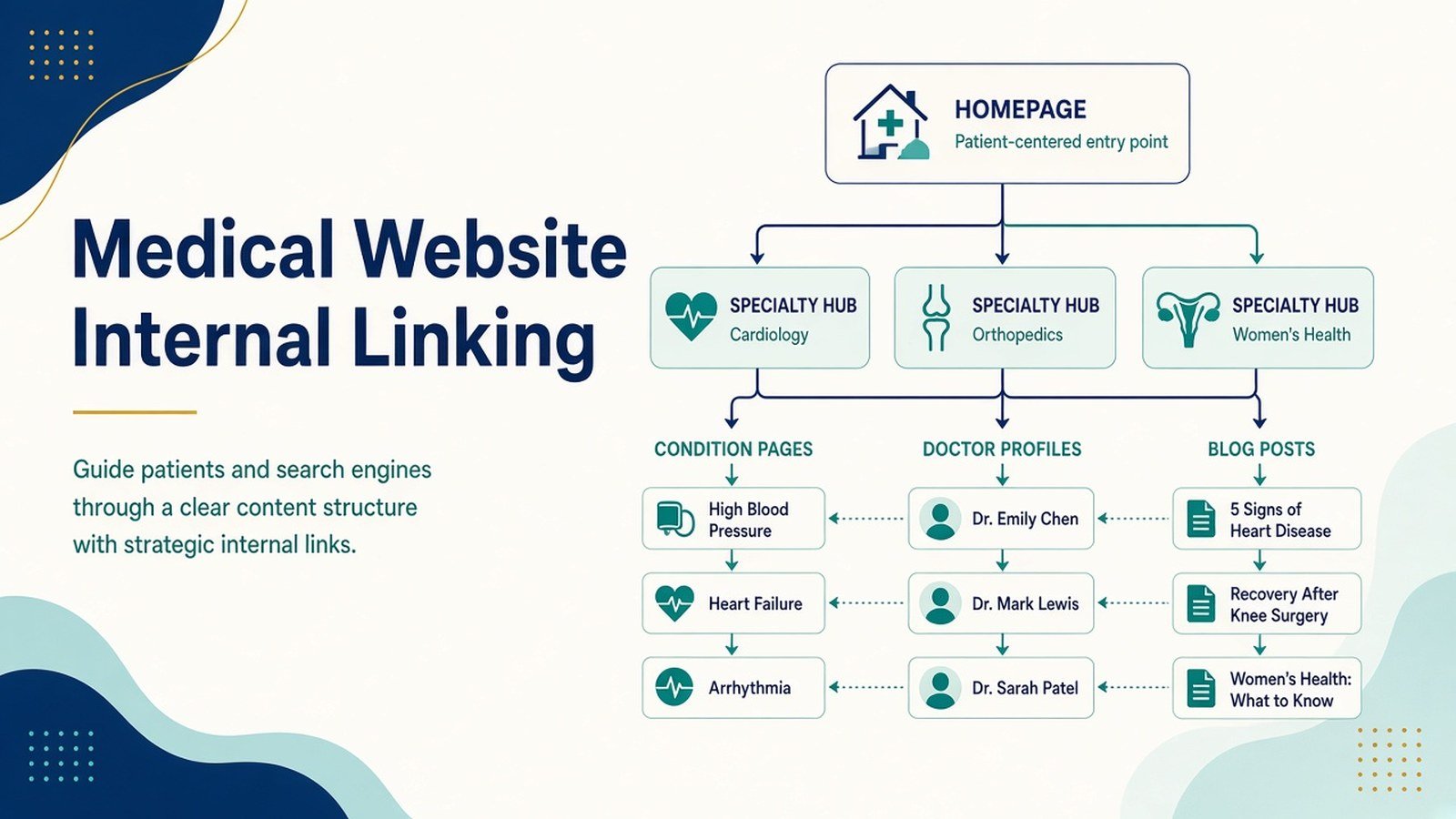
Most clinic websites in India grow the same way: a homepage, a few service pages, some doctor profiles, then a blog updated whenever there’s time. Three years later the site has 200 pages and almost none of them point to each other in a way that makes sense. Patients land on a blog post about knee pain and find no route to the orthopaedic department. Google finds the same post and can’t tell which page on the site actually deserves to rank for “knee replacement in Kolkata.”
That gap is what medical website internal linking is meant to close. Done properly, it shows patients and search engines which pages matter most and where to go next. This guide sets out a practical way to plan it, whether you run a single-doctor practice or a multi-speciality hospital.
Why internal linking matters more on healthcare sites?
A patient reading about thyroid symptoms at 11 pm wants to know whether to worry, which specialist to see and how to book. Answer the first question and strand them, and you’ve done half the job.
Search engines face a similar problem. Google’s own documentation on links explains that it uses links to discover pages and as a signal of how pages relate to one another, and that descriptive anchor text helps it understand what the destination page is about.
Health content also falls under what Google’s Search Quality Rater Guidelines call “Your Money or Your Life” topics, where evidence of expertise and trust carries more weight. A clear path from an article to its reviewing doctor and on to the department is one practical way to show that.
Poor linking also has a plain cost. Pages with no internal links pointing to them (orphan pages) can sit unindexed for months, and the problem never shows up in a design review, which is why it persists.
The principles behind good healthcare site architecture
Before adding a single link, it helps to agree on what the site is supposed to look like. Strong healthcare site architecture usually rests on four ideas.
- Hierarchy follows how patients think. Most people search by symptom or condition first, then by treatment, then by doctor or location. Your structure should let them move along that path in either direction.
- Every important page sits within three clicks of the homepage. If a department page needs five clicks to reach, users and crawlers will both struggle.
- Hub pages carry the weight. Each speciality (cardiology, dermatology, paediatrics) should have one central page that links out to its conditions, treatments and doctors, and receives links back from all of them.
- Anchor text describes the destination. “Read more” and “click here” tell nobody anything. “Our paediatric vaccination schedule” does.
A step-by-step method for building your internal linking plan
Step 1: Audit what exists
Crawl the site with a tool such as Screaming Frog or Sitebulb, or use the Links report in Google Search Console. Export every URL with its count of inbound internal links. Sort ascending. The pages at the top of that list, the ones with zero or one internal link, are your first priority.
Step 2: Map pages into clusters
Group every page under a speciality hub. A dermatology cluster might include the hub page, condition pages (acne, psoriasis, vitiligo), treatment pages (chemical peels, laser therapy), doctor profiles, and related blog posts.
Step 3: Define the link rules for each page type
This is where a written framework saves arguments later. A simple rule set for a clinic might look like this:
| Page type | Should link to | Should receive links from |
|---|---|---|
| Speciality hub | All conditions, treatments, doctors in that speciality | Homepage, main menu, every page in its cluster |
| Condition page | Relevant treatments, hub, treating doctors | Blog posts, hub, related conditions |
| Treatment page | Booking page, hub, doctors who perform it | Condition pages, hub |
| Doctor profile | Hub, treatments they offer, articles they reviewed | Hub, treatment pages, blog posts |
| Blog post | One or two condition or treatment pages, author profile | Related posts, condition pages |
Step 4: Fix doctor website navigation
Your main menu appears on every page, also known as doctor website navigation, which makes it your most powerful set of internal links. Keep it to the top-level hubs, a “Find a Doctor” page, locations, and booking. Resist the urge to put 40 conditions into a mega-menu. Breadcrumbs (Home > Cardiology > Heart Failure) add context on deeper pages and cost very little to implement on most CMS platforms.
Step 5: Add contextual links inside content
Links inside relevant paragraphs tend to carry more meaning than menus. When a blog post on gestational diabetes mentions screening, link that word to your antenatal care page. Aim for links that a reader would actually click, not a quota per article.
Step 6: Build the internal links for clinics with multiple locations
If you run branches in, say, Salt Lake and Behala, create a location page for each and link it to the doctors and services actually available there. Don’t link a location to a service it doesn’t offer; that creates frustrated phone calls, not appointments. So, creating internal links for clinics is very crucial.
Illustrative example: a multi-speciality clinic in Kolkata
This is a hypothetical scenario created to show the method. It does not describe a real client or real results.
Imagine a 12-doctor clinic in south Kolkata with cardiology, endocrinology and general medicine. Its blog has 60 posts, but the endocrinology hub page receives links only from the main menu. Meanwhile, 14 blog posts discuss diabetes and thyroid conditions without linking to that hub or to either endocrinologist.
A sensible plan would be to add a contextual link from each of those 14 posts to the most relevant condition page, link each condition page up to the endocrinology hub, and add an “Articles reviewed by this doctor” block to both doctor profiles. The team would then track whether the hub and condition pages gain impressions in Search Console over the following two to three months. That timeframe is a reasonable checkpoint, not a promise; results depend on competition, content quality and many other factors.
Common mistakes, limitations and compliance considerations
- Over-linking. Twenty links in a 600-word article dilute each one and hurt readability.
- Exact-match anchors everywhere. Repeating “best cardiologist in Kolkata” as anchor text across dozens of pages looks manipulative and reads badly. Vary the wording naturally.
- Linking to thin pages. Internal links can’t rescue a 150-word condition page. Improve the destination first.
- Patient data in URLs. Never build links or tracking parameters that include names, phone numbers, appointment IDs or condition details tied to an individual. India’s Digital Personal Data Protection Act, 2023 places obligations on how personal data is collected and processed, and health information deserves particular care. Check with your legal adviser on how the Act and its rules apply to your site.
- Testimonial and outcome pages. If you link to patient stories, make sure you have written consent and that the content follows current National Medical Commission guidance on professional conduct and advertising by doctors. Rules in this area have changed in recent years, so confirm the version in force before publishing.
- Marketing is not medical advice. Internal links should guide readers toward qualified consultation, not suggest that reading three linked articles replaces seeing a doctor. A short general-information note on condition pages helps.
How to measure progress and decide what to do next?
Internal linking results show up slowly, so check a few measures monthly.
- Orphan page count: should fall to zero for any page you want indexed.
- Indexed pages: watch the Pages report in Search Console for previously excluded URLs being picked up.
- Impressions and clicks for hub pages: gradual growth suggests Google is reading the new structure.
- Pages per session and paths to booking: in GA4, check whether visitors from blog posts reach treatment or booking pages more often.
- Crawl depth: re-run your crawler and confirm key pages now sit within three clicks.
If hub pages gain visibility but bookings don’t move, the issue is probably on the page itself (unclear calls to action, slow load times, missing doctor information) rather than the links. If nothing moves after a quarter, check content quality and technical issues such as stray noindex tags.
Quick action checklist
- Crawl the site and list pages with fewer than two internal links
- Assign every page to a speciality cluster
- Write a link rule table for each page type
- Trim the main menu to hubs, doctors, locations and booking
- Add breadcrumbs to deeper pages
- Place one to three contextual links in each blog post
- Remove any personal data from URLs and parameters
- Review testimonial pages for consent and regulatory compliance
- Set a monthly review in Search Console and GA4
Summary
Good internal linking on a medical site is less about SEO tricks and more about deciding how your pages relate, then making that visible. Start with an audit, organise content into speciality clusters, set clear rules for each page type, and measure steadily over months rather than weeks.
If you’d like to see how this fits into a wider search strategy for clinics and hospitals, the Healthcare SEO service page at Doctors Branding Agency outlines the areas such work usually covers, from site structure to content planning. Explore the relevant Doctors Branding Agency service details; keep the reference informative and non-promotional.
Keep reading
More from the Doctors Branding blog
-

Local SEO Beyond Google Business Profile: Other Signals Doctors Can Manage
Local SEO beyond Google Business Profile: other signals doctors can manage, from consistent listings and service pages to reviews and...
Read article → -
Local SEO for Diagnostic Centres and Pathology Labs
Practical local SEO for diagnostic centres: fix Google profiles, build unique lab pages, keep details consistent, and measure results for...
Read article → -
How to Optimise Doctor Profile Pages for Search and Trust?
A doctor profile SEO guide covering what to include on each page, Physician schema, NMC-compliant wording, and a clear path...
Read article →
Want this kind of thinking applied to your practice?
Start with a conversation about where your doctor, clinic or hospital marketing stands today.